Day 0 infrastructure
Bootstrapping Azure Terraform state
Jon Abbott
The Day 0 problem
The problem
- Terraform needs a remote backend for state and locking
- Azure Storage is the usual host — but something must create it first
- The primary Terraform config cannot create its own backend
- Manual Portal clicks or one-off scripts invite drift and risk
Challenges & requirements
- Fully automate backend resource creation
- Minimise manual intervention
- Repeat deployments across environments and subscriptions
- Stay aligned with IaC and run inside CI/CD
- Prefer native Azure tooling where possible
Choosing an approach
Options: Portal and CLI
Portal
Works with
- Quick PoCs
- No extra tooling
Watch for
- Not repeatable
- Hard to audit
- Config drift
Azure CLI
Works with
- CI/CD scripts
- Familiar ops
Watch for
- Imperative
- Custom idempotency
- Harder to maintain
Options: ARM and Bicep
ARM
Works with
- Native Azure
- Declarative
Watch for
- Verbose JSON
- Hard to author
- Superseded by Bicep
Bicep
Works with
- Declarative IaC
- CI/CD pipelines
- Idempotent deploys
Watch for
- Second IaC language
- Separate bootstrap repo
Decision: bootstrap with Bicep
- Dedicated subscription-scoped Bicep deploy runs before Terraform
- Creates the house: RG, storage, networking, diagnostics, RBAC
- Terraform configs assume the backend already exists
- Main Terraform never creates or manages bootstrap resources
Advantages of Bicep bootstrap
- Fully automated Day 0 infrastructure
- Repeatable across environments and subscriptions
- Aligns with Infrastructure as Code practices
- Azure-native, idempotent, CI/CD friendly
- Trade-off: maintain Bicep and Terraform side by side
The blueprint
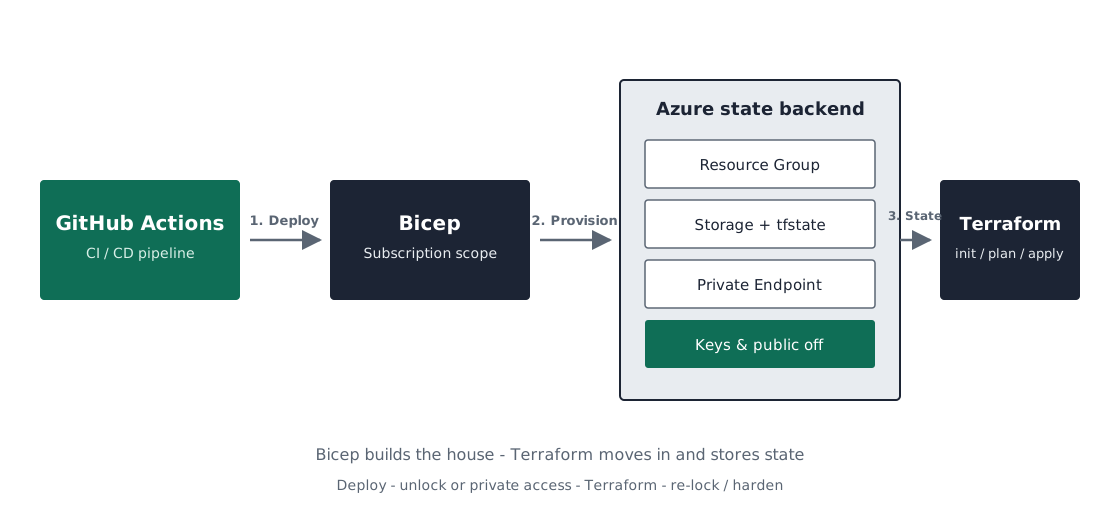
What Bicep provisions
- Resource group for state storage
- VNet, subnet, NSG, private endpoint, and private DNS
-
Zone-redundant storage account and
tfstatecontainer - Log Analytics workspace and blob diagnostics
- Entra ID RBAC for the pipeline identity
Hardened by default
Controls
Resting state
- Shared key access disabled — Entra ID only
- Public network access disabled — private endpoint only
- TLS 1.2 and HTTPS-only transit
- Blob versioning and 14-day soft delete
- Diagnostics to Log Analytics
Configuration
Defaults
- SKU: Standard_ZRS
- Default network action: Deny
- No public blob access
- NSG deny-all inbound on the state subnet
- Allow ~5 minutes for RBAC to sync
Pipeline access to state
- Hosted runners cannot reach a private-endpoint-only account
- Prefer self-hosted agents inside the VNet (or peered)
- Or temporarily unlock / whitelist the runner IP, then re-lock
-
Set
BOOTSTRAP_TF=falseto skip redeploy once live
Deploy the bootstrap
              az deployment sub create \
                --location uksouth \
                --template-file bicep/main.bicep \
                --parameters bicep/environments/dev.params.json \
                --parameters workflowPrincipalId=<OID>
Point Terraform at the backend
              terraform {
                backend "azurerm" {
                  resource_group_name  = "…-rg-uks-terraform"
                  storage_account_name = "…tfstatestorage"
                  container_name       = "tfstate"
                  key                  = "dev.terraform.tfstate"
                  use_azuread_auth     = true
                }
              }